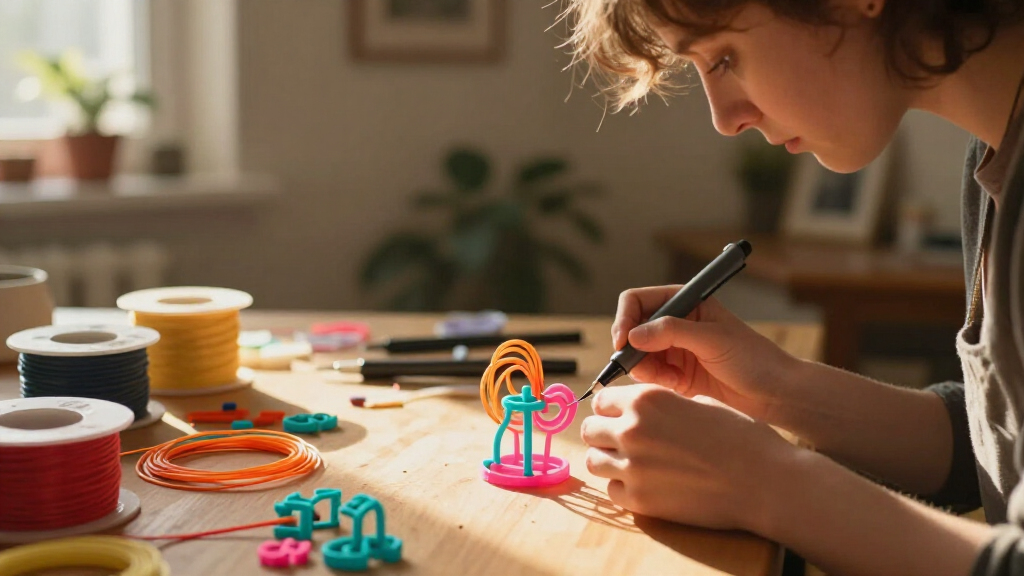
For most creative projects, I would start with the MYNT3D Professional: its OLED display and adjustable controls give makers more say over how filament flows. The 3Doodler Start+ Essentials is a better fit for younger users, while the SCRIB3D Advanced Kit suits buyers who want a broad starter set. The main tradeoff is between simpler, more approachable operation and greater control over heat, speed, and material choice. Kits also differ in how much filament and project guidance they include, which can shape the first few sessions. Read on for the full comparison and advice on matching a pen to your projects.

Get art and craft supplies delivered free with Prime
- Fast, free delivery on millions of items
- Prime Video, Amazon Music and more included
- Member-only deals all year
Key Takeaways
- MYNT3D Professional leads for control: its OLED display and adjustable settings make it a more capable pick for varied creative work than the simpler Super model.
- 3Doodler Start+ prioritizes younger users: its low-heat approach favors safer, guided making over the material flexibility and fine control of heated pens.
- SCRIB3D kits compete on getting started: the P1 and Advanced Kit include PLA-focused supplies, while the Advanced package makes more sense for buyers who value a fuller kit.
- The 3Doodler options serve different ages and ambitions: Start+ is kid-oriented, while Create+ and Flow are aimed at older makers who want more involved projects.
- Material compatibility changes the creative ceiling: MYNT3D Super accepts 1.75 mm ABS and PLA, but a broader material choice can bring added heat, odor, and handling demands.
| MYNT3D Professional 3D Printing Pen with OLED Display |  | Best for Fine Temperature Control | Temperature range: 130–240°C, adjustable in 1°C increments | Power output: 10 watts | Input: 5 V DC, 2 A | VIEW LATEST PRICE | See Our Full Breakdown |
| 3Doodler Start+ Essentials 3D Pen Set for Kids |  | Best for Young Beginners | Recommended age: 6+ | Filament strands: 72 mixed-color strands | Charging port: USB-C | VIEW LATEST PRICE | See Our Full Breakdown |
| SCRIB3D P1 3D Printing Pen with Display and PLA Filament Kit |  | Best for Switching Between Materials | PLA temperature range: 160–210°C (320–410°F) | ABS temperature range: 210–235°C (410–455°F) | Filament compatibility: PLA and ABS | VIEW LATEST PRICE | See Our Full Breakdown |
| Juku 3Doodler Create+ 3D Printing Pen Steel Blue |  | Best for Larger, Faster Builds | Speed control: Fast and slow modes | Drive system: Dual-drive technology | Filament compatibility: PLA, ABS, and FLEXY plastics | VIEW LATEST PRICE | See Our Full Breakdown |
| SCRIB3D Advanced 3D Printing Pen Kit |  | Best for a Ready-to-Start PLA Kit | Display: LCD | Speed settings: 8 | Filament type: PLA | VIEW LATEST PRICE | See Our Full Breakdown |
| MYNT3D Super 3D Printing Pen, 1.75 mm ABS and PLA Compatible |  | Best for Adjustable Material Control | Filament compatibility: 1.75 mm ABS and PLA | Dimensions: 3.98 x 8.31 x 2.32 inches | Weight: 7.7 ounces | VIEW LATEST PRICE | See Our Full Breakdown |
| 3Doodler Flow 3D Printing Pen for Teens, Adults & Creators – Black with Free Refill Filaments, Stencil Book & Guide |  | Best Starter Bundle for Project Variety | Filament compatibility: 1.75 mm PLA, ABS, and wood | Dimensions: 3.1 x 10.74 x 4.44 inches | Weight: 15.8 ounces | VIEW LATEST PRICE | See Our Full Breakdown |
| 3D printing pens for creative project | Dimensions | Weight | Filament compatibility | Included filament |
|---|---|---|---|---|
| MYNT3D Professional 3D Printin | 7.99 x 5.2 x 2.6 inches | 12 ounces | — | Three colors; material listed as both PLA and ABS |
| 3Doodler Start+ Essentials 3D | — | — | 3Doodler Start plastics | — |
| SCRIB3D P1 3D Printing Pen wit | 4.61 x 7.87 x 1.97 inches | 11.6 ounces | PLA and ABS | Three colors; 30 feet total |
| Juku 3Doodler Create+ 3D Print | 10.8 x 4.55 x 3.13 inches | 1.3 pounds | PLA, ABS, and FLEXY plastics | — |
| SCRIB3D Advanced 3D Printing P | — | — | — | Five colors; approximately 50 feet in the description, while the title states 20 feet |
| MYNT3D Super 3D Printing Pen | 3.98 x 8.31 x 2.32 inches | 7.7 ounces | 1.75 mm ABS and PLA | — |
| 3Doodler Flow 3D Printing Pen | 3.1 x 10.74 x 4.44 inches | 15.8 ounces | 1.75 mm PLA, ABS, and wood | Eight colors, 80 feet total |
More Details on Our Top Picks
MYNT3D Professional 3D Printing Pen with OLED Display
The MYNT3D Professional is the strongest fit here for makers who want to adjust heat precisely while shaping small details. Its 1°C temperature increments and OLED readout make it easier to track material settings than the simpler kid-focused 3Doodler Start+, while adjustable extrusion speed gives more control over line thickness and pace. The lightweight, ergonomic pen also suits longer drawing sessions better than the heavier Juku 3Doodler Create+. The tradeoff is that the included filament is described inconsistently as both PLA and ABS, so I would verify the material before choosing a temperature. It also lacks the broader project bundle of the SCRIB3D Advanced, which includes more filament colors and a stencil guide. Choose this MYNT3D for control, not for the most complete starter kit.
Pros:- Temperature adjusts in 1°C increments, supporting precise material tuning.
- OLED display makes the current temperature easier to monitor.
- Adjustable extrusion speed supports both detail work and faster filling.
- Lightweight, ergonomic design is suited to handheld drawing.
Cons:- Included filament is inconsistently identified as PLA and ABS.
- The three-color filament bundle is less extensive than the SCRIB3D Advanced kit.
- Does not have the no-hot-parts design offered by the 3Doodler Start+.
Best for: Makers who already know which filament they plan to use and want fine temperature and speed adjustments for detailed drawings.
Not ideal for: Families seeking a child-safe pen or beginners who want a clearly specified, ready-to-use filament bundle; the filament material listing is ambiguous.
- Temperature range:130–240°C, adjustable in 1°C increments
- Power output:10 watts
- Input:5 V DC, 2 A
- Included filament:Three colors; material listed as both PLA and ABS
- Display:OLED
- Dimensions:7.99 x 5.2 x 2.6 inches
- Weight:12 ounces
- Warranty:1-year limited
Our verdict“Choose the MYNT3D Professional if fine temperature control matters more to your creative work than a large starter bundle or child-focused safety design.”
3Doodler Start+ Essentials 3D Pen Set for Kids
For a child’s first 3D pen, the 3Doodler Start+ puts safety and guided play ahead of material flexibility. Its no-hot-parts design and standby mode make it a more suitable pick for ages 6 and up than the heated MYNT3D Professional or SCRIB3D P1. The included doodle mat, activity guide, and 72 mixed-color strands give young creators a clear starting point for screen-free projects without needing to assemble a separate kit. That simplicity comes with a firm limitation: it works only with 3Doodler Start plastics, unlike the SCRIB3D P1, which supports PLA and ABS. The listing also gives no charging time or battery runtime, making it hard to plan longer activities. I’d choose this for supervised creative play, not for adults seeking fine material or temperature control.
Pros:- Designed without hot parts for a child-focused experience.
- Standby safety mode adds a pause feature during activities.
- Includes 72 mixed-color strands, a doodle mat, and an activity guide.
- USB-C charging and a slimmer design support straightforward setup.
Cons:- Compatible only with 3Doodler Start plastics.
- No charging-time or battery-runtime information is provided.
- Offers less material and temperature control than the MYNT3D Professional and SCRIB3D P1.
Best for: Parents and educators introducing children aged 6 and up to hands-on, screen-free 3D drawing with a safety-focused pen.
Not ideal for: Older teens, adults, or makers who want PLA/ABS compatibility, adjustable temperature settings, or detailed control over extrusion.
- Recommended age:6+
- Filament strands:72 mixed-color strands
- Charging port:USB-C
- Safety features:No hot parts; standby mode
- Included items:3D pen, doodle mat, mixed-color plastics, USB-C cable, activity guide
- Filament compatibility:3Doodler Start plastics
- Packaging:100% recyclable materials
Our verdict“Pick the 3Doodler Start+ for a child’s first guided 3D pen experience, but skip it if you need open filament compatibility or adjustable heat.”
SCRIB3D P1 3D Printing Pen with Display and PLA Filament Kit
The SCRIB3D P1 is a practical choice for crafters who want to move between PLA and ABS without stepping up to a more elaborate kit. Its temperature ranges for both materials and stepless speed control let users slow down for fine outlines or increase flow when filling larger shapes. Compared with the MYNT3D Professional, the P1 spells out its PLA and ABS temperature ranges, though the MYNT3D offers finer 1°C increments. The two-minute auto-sleep feature is useful for short craft sessions, while the included stencil guide and manual make early projects easier to start. Its limits are the modest 30-foot filament supply and a warm-up that takes about 2–3 minutes. I’d favor it over the SCRIB3D Advanced when clear material ranges matter more than extra colors and filament length.
Pros:- Separate temperature ranges are listed for PLA and ABS.
- Stepless speed control supports fine detailing and faster filling.
- Two-minute auto-sleep helps limit idle operation.
- Includes three PLA colors, a stencil guide, manual, and power adapter.
Cons:- Warm-up takes about 2–3 minutes.
- The included filament totals only 30 feet.
- Temperature adjustment is less fine-grained than the MYNT3D Professional’s 1°C increments.
Best for: Craft users who want to work with both PLA and ABS and value clear temperature guidance, stepless speed control, and a simple starter guide.
Not ideal for: Creators who expect long sessions from the included filament or need a pen that is ready to extrude immediately.
- PLA temperature range:160–210°C (320–410°F)
- ABS temperature range:210–235°C (410–455°F)
- Filament compatibility:PLA and ABS
- Included filament:Three colors; 30 feet total
- Auto sleep:2 minutes
- Warm-up time:About 2–3 minutes
- Dimensions:4.61 x 7.87 x 1.97 inches
- Weight:11.6 ounces
- Warranty:1 year
Our verdict“Choose the SCRIB3D P1 if you want stated PLA and ABS settings with flexible speed control, and accept a short filament supply and warm-up wait.”
Juku 3Doodler Create+ 3D Printing Pen Steel Blue
The Juku 3Doodler Create+ is aimed at creators who want to shift between broad strokes and fine work without relying on a single feed speed. Its dual-drive system with fast and slow modes makes that change straightforward, and the included PLA and ABS refills in 15 colors offer more palette variety than the three-color SCRIB3D P1 kit. It also lists compatibility with FLEXY plastics, giving projects another material option. The drawback is handling: at 1.3 pounds, it is substantially heavier than the MYNT3D Professional, a meaningful difference when drawing for extended periods. The product data also says only three items are included despite describing multiple refill colors and tools, so package contents are less clear than the SCRIB3D Advanced kit. I’d choose it for varied builds, not lightness or a clearly itemized bundle.
Pros:- Fast and slow modes support both broad coverage and finer detail.
- Dual-drive technology is designed for controlled extrusion.
- Package description lists PLA and ABS refills in 15 colors.
- Compatible with PLA, ABS, and FLEXY plastics.
Cons:- At 1.3 pounds, it is heavier than the other listed handheld pens.
- Package data lists three items despite describing refills and tools, leaving the contents unclear.
- Its supported plastic types are limited to PLA, ABS, and FLEXY.
Best for: Experienced hobbyists making larger models, jewelry, or mixed-detail projects who value two speed modes and a broad color selection.
Not ideal for: Children, users with limited hand strength, or anyone planning long handheld sessions who would prefer a lighter pen like the MYNT3D Professional.
- Speed control:Fast and slow modes
- Drive system:Dual-drive technology
- Filament compatibility:PLA, ABS, and FLEXY plastics
- Included refills:PLA and ABS refills in 15 colors
- Weight:1.3 pounds
- Dimensions:10.8 x 4.55 x 3.13 inches
- Color:Steel Blue
- Manufacturer-listed item count:3
Our verdict“Choose the Juku Create+ for color variety and two-speed control on varied builds, but skip it if low weight or a clearly specified kit matters more.”
SCRIB3D Advanced 3D Printing Pen Kit
The SCRIB3D Advanced makes the most sense for a beginner or hobbyist who wants several PLA colors and project guidance in one package. Its LCD display, variable temperature control, and eight speed settings give more adjustment options than the child-oriented 3Doodler Start+, while the stencil guide helps turn those controls into a first project. Five PLA colors and the described 50-foot supply also give it a stronger creative starting point than the SCRIB3D P1’s 30 feet. There is a caveat: the listing conflicts, with the title stating 20 feet and the description giving approximately 50 feet, so the actual amount is uncertain. Like the P1, it takes about 2–3 minutes to warm up. I’d pick it over the Juku Create+ for a more clearly guided PLA-focused setup, but not for multi-material flexibility.
Pros:- Eight speed settings allow a choice between detailed work and faster extrusion.
- Variable temperature control and an LCD display support adjustable operation.
- Includes five PLA colors, a manual, and a stencil guide.
- Anti-clogging and safety features are built into the pen.
Cons:- Warm-up takes approximately 2–3 minutes.
- Filament quantity is inconsistent: the title says 20 feet, while the description says approximately 50 feet.
- The listed filament is PLA, offering less material flexibility than the SCRIB3D P1 or Juku Create+.
Best for: New hobbyists and casual makers who want guided PLA projects, several speed choices, and a multi-color starter supply.
Not ideal for: Creators who need ABS compatibility or certainty about the included filament length; the stated amount conflicts between listing details.
- Display:LCD
- Speed settings:8
- Filament type:PLA
- Included filament:Five colors; approximately 50 feet in the description, while the title states 20 feet
- Warm-up time:Approximately 2–3 minutes
- Included accessories:Power adapter, manual, stencil guide
- Controls:Variable temperature and speed
- Warranty:1 year
Our verdict“Choose the SCRIB3D Advanced for a guided, multi-color PLA starter kit, but look elsewhere if you require ABS or a confirmed filament quantity.”
MYNT3D Super 3D Printing Pen, 1.75 mm ABS and PLA Compatible
The MYNT3D Super is a practical choice for creators who want to tune how filament feeds rather than rely on a fixed pace. Its adjustable extrusion speed helps with both detailed lines and faster fill work, while temperature settings let users work with ABS or PLA. Compared with the 3Doodler Flow, it keeps the starter bundle simpler: three filament colors instead of eight, and no listed LCD for checking temperature at a glance. In return, its 7.7-ounce weight makes it the lighter of these two picks for longer drawing sessions. The product details are inconsistent about whether the included filament is PLA or ABS, so I would verify the bundle contents before relying on it for a particular material. It suits makers who value manual control over a larger starter supply.
Pros:- Adjustable extrusion speed supports fine detail and faster material flow.
- Temperature settings accommodate both ABS and PLA.
- Lightweight 7.7-ounce design can be more comfortable during extended projects.
- Includes three filament colors and an AC adapter.
Cons:- Product information conflicts about whether the included filament is PLA or ABS.
- Three included colors offer less variety than the eight-color 3Doodler Flow bundle.
- No display for real-time temperature monitoring is listed.
Best for: Makers who want adjustable feed speed and temperature for experimenting with ABS and PLA, and prefer a lightweight pen.
Not ideal for: Buyers who want a large assortment of starter filament or a screen showing temperature; the listed kit includes only three colors and no display is specified.
- Filament compatibility:1.75 mm ABS and PLA
- Dimensions:3.98 x 8.31 x 2.32 inches
- Weight:7.7 ounces
- Power output:10 watts
- Input:5 V DC, 2 A
- Adapter input:100–240 V AC, 50/60 Hz
- Certifications:FCC, CE, and RoHS
- Included:3D pen, three colors of filament, and AC adapter
Our verdict“Choose the MYNT3D Super if adjustable speed and temperature matter more to you than a larger starter filament assortment or an LCD.”
3Doodler Flow 3D Printing Pen for Teens, Adults & Creators – Black with Free Refill Filaments, Stencil Book & Guide
The 3Doodler Flow makes it easier to begin a project without first sourcing extra supplies: its kit includes eight filament colors, a stencil book, and a guide. That ready-to-create bundle gives it an advantage over the MYNT3D Super, which includes only three colors, and the integrated LCD adds a clear temperature readout while working. It also accepts PLA, ABS, and wood filament, giving creative users more material options than the MYNT3D Super’s listed PLA and ABS compatibility. The tradeoff is a heavier 15.8-ounce listed weight, more than double the Super’s 7.7 ounces, which may matter during long sessions or when carrying it between activities. Filament remains limited to 1.75 mm, and no advanced temperature presets or dedicated software are listed. I’d pick it for varied, guided projects rather than the lightest possible pen.
Pros:- Includes eight colors and 80 feet of filament for varied projects from the start.
- Stencil book and guide offer structure for learning and trying new designs.
- LCD provides real-time temperature monitoring.
- Supports 1.75 mm PLA, ABS, and wood filaments.
Cons:- At 15.8 ounces, it is substantially heavier than the MYNT3D Super for extended drawing sessions.
- Compatible only with 1.75 mm filament.
- No dedicated software or advanced temperature presets are listed.
Best for: Teens, adults, and classroom or hobby creators who want several filament colors, project prompts, and a visible temperature readout in one kit.
Not ideal for: Creators prioritizing a very lightweight pen, advanced temperature presets, or filament sizes beyond 1.75 mm.
- Filament compatibility:1.75 mm PLA, ABS, and wood
- Dimensions:3.1 x 10.74 x 4.44 inches
- Weight:15.8 ounces
- Model number:3DFLOW-US
- Included filament:Eight colors, 80 feet total
- Display:Integrated LCD with real-time temperature monitoring
- Included accessories:Stencil book and guide
Our verdict“Choose the 3Doodler Flow if you want a guided, color-rich starter kit with an LCD and wood-filament compatibility, and can accept its added weight.”

How We Picked
I compared these pens for the needs that shape creative projects: control over filament flow, ease of learning, material compatibility, age suitability, and the usefulness of included supplies or project guidance. I also weighed how much flexibility each tool offers against setup demands and the extra care that heated pens require. A pen that is approachable for a child is not automatically the best tool for intricate models, and a more adjustable pen is not automatically the right choice for a casual first project.
The ranking gives the lead to the MYNT3D Professional because adjustable controls and an OLED display support a wider range of work. The kid-focused Start+ earns a distinct place for age-appropriate making, while SCRIB3D kits stand out for buyers who want supplies bundled with the pen. The remaining models offer useful alternatives, but their appeal depends more narrowly on whether a buyer prioritizes a straightforward tool, a creator-oriented set, or wider filament compatibility. I treat these as feature-based comparisons, not claims of hands-on testing.
| 3D printing pens for creative project | Included filament |
|---|---|
| MYNT3D Professional 3D Printin | Three colors; material listed as both PLA and ABS |
| 3Doodler Start+ Essentials 3D | — |
| SCRIB3D P1 3D Printing Pen wit | Three colors; 30 feet total |
| Juku 3Doodler Create+ 3D Print | — |
| SCRIB3D Advanced 3D Printing P | Five colors; approximately 50 feet in the description, while the title states 20 feet |
| MYNT3D Super 3D Printing Pen | — |
| 3Doodler Flow 3D Printing Pen | Eight colors, 80 feet total |
Factors to Consider When Choosing 3D Printing Pens For Creative Projects
Before choosing a pen, I would match its operating style to the way you plan to create. A tool for quick ornaments or guided crafts has different demands from one used for small repairs, layered sculptures, or detailed lettering. These factors can help you choose without paying for flexibility you will not use—or buying a simple pen that limits your ideas.
Match Heat and Age to the Maker
Start with who will hold the pen and how closely an adult can supervise. A low-heat design such as the 3Doodler Start+ is aimed at younger makers, while pens that melt conventional filament require more care around the nozzle and freshly extruded plastic. A common mistake is choosing by age label alone; think about patience, grip control, and whether the maker can follow safe handling steps. If a project involves long sessions, check how the pen is powered and whether its operating routine suits the workspace. For a child making simple shapes with an adult nearby, ease and safety can outweigh advanced settings. For an older maker producing fine details, controlled extrusion may matter more than a low-heat approach.
Choose Filament Around the Project
Material choice affects more than color: it can change flexibility, strength, finish, odor, and handling demands. PLA is a common starting point for decorative work, while ABS compatibility can appeal to makers seeking a different working feel or material behavior. Do not assume every filament fits every pen; check the supported type and diameter before buying refills. Another frequent mistake is treating a pen that accepts more materials as an automatic upgrade, even when the added heat and ventilation needs do not suit the maker. For gifts or classroom use, a narrower, clearly specified material system may be easier to manage. For experiments and varied builds, compatibility can justify choosing a more flexible model.
Decide How Much Control You Need
Temperature and feed-speed controls help when a design needs steadier lines, careful layering, or a change in flow for different tasks. A display can make settings easier to see, but extra controls also add decisions for a beginner. If your projects are mostly simple outlines and small decorations, a straightforward pen may be easier to pick up and use. For prototypes, joins, or detailed structures, adjustable output can help you tune the line instead of compensating with hand speed alone. Avoid paying for controls before you know what you want to make. A good rule is to choose the simplest tool that can handle the most demanding project you expect to attempt.
Look Beyond the Starter Filament
Included filament, stencils, and guides can make a kit easier to start using, especially when the maker has not tried 3D pen work before. Those extras do not tell you how costly or convenient it will be to keep creating, so check which refills the pen accepts and how readily you can find them. Some kits provide a useful launch point but may leave you wanting more colors or material options after a few projects. A common buying error is focusing on the number of included accessories rather than whether they support the kind of work you want to make. Templates and instructions are especially useful for confidence-building, but experienced makers may prefer a pen with flexible settings. Choose a bundle for its practical supplies, not its box contents alone.
Think About Workspace and Project Scale
3D pens are hand-guided tools, so the project size and working surface matter as much as the pen itself. Tiny lettering and narrow joins call for a steadier hand and controlled feed, while larger decorations can be more forgiving but use more filament and time. Plan for a heat-safe surface, room to set the pen down, and ventilation appropriate to the filament being used. A frequent mistake is starting a large freehand build before practicing lines and supports on scrap material. Stencils can help with repeatable shapes, but they do not replace a stable base for assembling larger pieces. If your goal is precise, repeatable parts, consider whether a handheld pen is the right method for the job at all.
Frequently Asked Questions
Which of these pens makes the most sense for a first-time adult maker?
I would choose based on whether you want to learn the controls or start with guided projects. The SCRIB3D P1 offers a straightforward entry point with a display and PLA filament kit, while the Advanced Kit suits someone who values a broader starter package. If you expect to experiment with different line speeds and temperatures, the MYNT3D Professional offers more room to tune the process. A first-time user does not need the most feature-rich pen if simple decorations are the goal. Check the included instructions and refill compatibility before deciding, since those can matter more during early projects than advanced settings.
Is a low-heat pen better for children than a standard heated 3D pen?
A low-heat design can reduce exposure to a hot nozzle, which is why the 3Doodler Start+ is the clearest child-oriented option in this lineup. It does not remove the need for adult supervision or make every part of the activity risk-free. Standard heated pens can offer broader material and control options, but those benefits come with more care around the nozzle and extruded plastic. The right choice depends on the child’s age, coordination, and ability to follow instructions, as well as the adult support available. Check the manufacturer’s age guidance and safety directions before use.
Should I choose a pen with ABS compatibility for creative projects?
Choose ABS compatibility when you have a specific reason to work with that material and are prepared to follow its handling and ventilation guidance. For many decorative projects, PLA support is enough to get started and can keep the material choice simpler. The MYNT3D Super is explicitly compatible with 1.75 mm ABS and PLA, but that flexibility does not by itself make it the best choice for every maker. Confirm that replacement filament matches both the pen’s supported material and diameter. If you are unsure which material suits your projects, begin with the option recommended by the pen maker and expand only when a project calls for it.
Do the included stencils and guides matter, or should I focus on pen controls?
Guides and stencils can make early projects less frustrating by showing how to build shapes and giving new users a repeatable starting point. They are especially useful for younger makers or anyone who has not practiced drawing with extruded plastic. Controls matter more when you already have a clear project in mind and need to adjust flow or temperature to suit the work. The 3Doodler Flow package includes a stencil book and guide, while models such as the MYNT3D Professional put more emphasis on adjustable operation. Pick guidance for learning and controls for experimentation; neither feature fully replaces practice.
Can a 3D printing pen replace a 3D printer for precise parts?
A pen is better suited to freehand forms, decorative details, quick repairs, and one-off creative builds than to producing repeatable, dimensionally precise parts. The result depends on hand movement, line placement, and support during construction, so matching several identical pieces can be difficult. Adjustable pens can improve control, but they do not provide the guided motion of a printer. If a project needs exact measurements or several matching components, a 3D printer or another fabrication method is usually a better fit. A pen can still add hand-built details to printed parts or help with simple joining tasks.
Conclusion
For the best overall creative tool, I recommend the MYNT3D Professional, whose display and adjustable settings make it the most adaptable pick here. For a best value-style starter, the SCRIB3D P1 is a practical choice for buyers who want a display and PLA kit without prioritizing extensive material flexibility; the SCRIB3D Advanced Kit is a better fit when a fuller bundle matters more. The best option for beginners and younger makers is the 3Doodler Start+ because its low-heat design serves a different audience from standard heated pens. For a premium-leaning choice for varied materials, consider the MYNT3D Super if its ABS and PLA compatibility fits your plans, while recognizing that the Professional offers more visible control. Choose the 3Doodler Flow for a creator-oriented package with a guide and stencil book, or the Create+ when you want a pen aimed at more involved making. Match the pen to the person, material, and project scale, and you will have a clearer reason for your pick than feature count alone.
Halloween Picks

10 ft Halloween Inflatable Archway with Built-in LEDs

Kalolary 12ft Halloween Witch Haunted House Inflatable Archway

Govee Outdoor Halloween Projector Light with 3D Dynamic Visuals and Nebula Effect
As an affiliate, we earn on qualifying purchases.