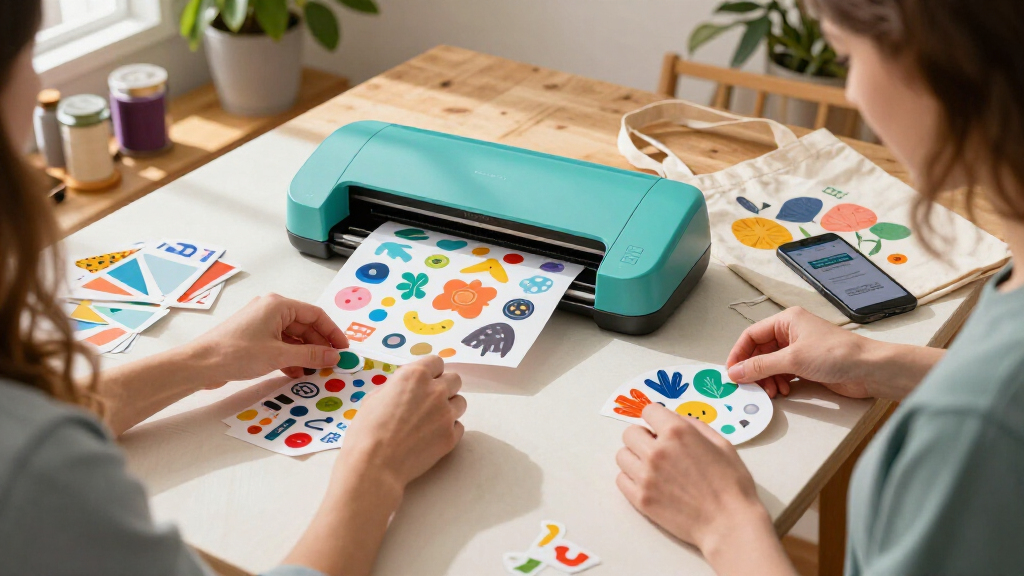

When comparing Cricut cutting machine deals, I would start with the Cricut Explore 4 for a capable everyday setup, then weigh the Maker bundles if you need broader material options or project supplies. The compact Cricut Joy models suit smaller projects and limited workspace, while Joy Xtra adds room for more ambitious layouts. Bundle contents matter as much as the machine: vinyl, tools, and digital content can save separate shopping, but may include supplies you will not use. The main tradeoff is between compact simplicity, general-purpose cutting, and the Maker line’s wider creative range. Read on for how these ten machines and bundles compare.

Get art and craft supplies delivered free — and shop member deals
- Fast, free delivery on millions of items
- Access to Prime Big Deal Days deals on October 6–7
- Prime Video, Amazon Music and more included
Key Takeaways
Explore 4 is the clearest general-purpose starting point in this lineup for buyers who want a standalone smart cutting machine without choosing among several bundle contents.
Maker 4 bundles split by project focus: the Engagement Bundle, vinyl bundle, and sticker-making bundle package the same machine family around different supplies and intended uses.
Explore 5 bundles make included content and accessories part of the decision; compare the Essential and Multicolor options against the supplies you already own.
Joy is the compact choice, while Joy Xtra offers a larger creative footprint for buyers whose projects have outgrown the smallest format.
Bundle value depends on useful contents: a larger package is only a better fit when its materials, tools, and digital content match the projects you plan to make.
| Cricut Joy Compact Cutting Machine with Digital Content Library |  | Best Compact Pick | Weight: 3.9 lbs (about 1.8 kg) | Material Compatibility: 50+ materials | Connectivity: Bluetooth | VIEW LATEST PRICE | See Our Full Breakdown |
| Cricut Explore 4 Smart Cutting Machine, Seashell |  | Best Budget Entry to the Explore Line | Model: Cricut Explore 4 | Model Number: 2011070 | Color: Seashell | VIEW LATEST PRICE | See Our Full Breakdown |
| Cricut Maker 4 Smart Cutting Machine – Seashell (Engagement Bundle) |  | Best Overall for New Serious Crafters | Model: Cricut Maker 4 | Color: Seashell | Compatible Materials: 300+ (leather, wood, vinyl, iron-on HTV, cardstock, stickers, and more) | VIEW LATEST PRICE | See Our Full Breakdown |
| Cricut Maker 4 Vinyl Cutting Bundle with Rainbow Smart Vinyl and Tools |  | Best for Vinyl Decal Enthusiasts | Included Vinyl: 5 multicolored Smart Vinyl rolls | Roll Size: 13 in × 3 ft each | Included Accessories: Transfer tape and tools | VIEW LATEST PRICE | See Our Full Breakdown |
| Cricut Maker 5 Essential Bundle with Digital Content, Slate Blue |  | Best Premium Pick | Model: Cricut Maker 5 | Color: Slate Blue | Cutting Width: 12 in (30.5 cm) | VIEW LATEST PRICE | See Our Full Breakdown |
| Cricut Joy Xtra Cutting Machine and Smart Vinyl Bundle |  | Best Vinyl Starter Kit | Included items: Cricut Joy Xtra machine, rainbow permanent Smart Vinyl, transfer tape, essential tools, digital design guides | Vinyl type: Permanent Smart Vinyl | Cutting mat required: No — Smart Vinyl loads without a mat | VIEW LATEST PRICE | See Our Full Breakdown |
| Cricut Explore 5 Essential Bundle with Digital Content, Taupe | 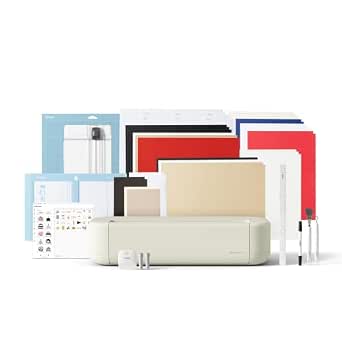 | Best Value Full-Size Machine | Cutting width: 12 in (30.5 cm) | Compatible materials: 100+ materials, including vinyl, iron-on, cardstock, and printables | Functions: Cuts, writes, draws, foils, and scores | VIEW LATEST PRICE | See Our Full Breakdown |
| Cricut Explore 5 Multicolor Essential Bundle |  | Best for Apparel and Decal Projects | Materials supported: 100+ | Connectivity: Bluetooth | Matless cutting: Compatible with Cricut Smart Materials | VIEW LATEST PRICE | See Our Full Breakdown |
| Cricut Maker 4 Ultimate Sticker Making Bundle, Seashell |  | Best for Small Business Sticker Makers | Model: z20-11084-N4 | Color: Seashell | Included components: Cricut Maker 4 machine, printable sticker materials, adhesive vinyl, tools, project guidance | VIEW LATEST PRICE | See Our Full Breakdown |
| Cricut Joy 2 Essential Bundle with Digital Content, Blue |  | Best Compact Craft Machine | Cutting width: 4.5 in (11.4 cm) | Weight: Just over 2 lbs (0.91 kg) | Material compatibility: 75+ materials | VIEW LATEST PRICE | See Our Full Breakdown |
| Cricut cutting machine deal | Connectivity | Color |
|---|---|---|
| Cricut Joy Compact Cutting Mac | Bluetooth | — |
| Cricut Explore 4 Smart Cutting | — | Seashell |
| Cricut Maker 4 Smart Cutting M | — | Seashell |
| Cricut Maker 4 Vinyl Cutting B | — | — |
| Cricut Maker 5 Essential Bundl | Bluetooth wireless | Slate Blue |
| Cricut Joy Xtra Cutting Machin | — | — |
| Cricut Explore 5 Essential Bun | Bluetooth | Taupe |
| Cricut Explore 5 Multicolor Es | Bluetooth | — |
| Cricut Maker 4 Ultimate Sticke | — | Seashell |
| Cricut Joy 2 Essential Bundle | Bluetooth | — |
More Details on Our Top Picks
Cricut Joy Compact Cutting Machine with Digital Content Library
The Cricut Joy earns its spot here for sheer portability — at 3.9 lbs, it is the machine you can actually keep in a drawer or take to a friend’s house. Where the Cricut Maker 4 demands a dedicated workspace, the Joy is built for small, quick projects like labels, cards, and decals. Its standout trick is matless cutting with Smart Materials, which trims setup time dramatically for simple jobs.
The tradeoffs are real, though. With a narrower cutting width than full-size models and only 50+ compatible materials versus 300+ on the Maker line, this is a starter or second machine, not a workshop workhorse. Non-Smart Materials still require the StandardGrip mat, which undercuts some of the convenience.
Pros:- Genuinely portable at under 4 lbs — smallest footprint in the lineup
- Matless cutting with Smart Materials speeds up simple projects
- Cuts repeated designs up to 20 ft long for banners and continuous decals
- Works across iOS, Android, Windows, and Mac via Bluetooth
Cons:- Only 50+ compatible materials, far fewer than full-size models
- Standard materials still require a mat, limiting the matless convenience
Best for: Apartment crafters and casual users who want quick labels, cards, and small decals without dedicating counter space
Not ideal for: Serious crafters working with fabric, leather, or wood — the material range and cutting width fall well short of the Maker 4 or Maker 5
- Weight:3.9 lbs (about 1.8 kg)
- Material Compatibility:50+ materials
- Connectivity:Bluetooth
- App Compatibility:iOS, Android, Windows, Mac
- Cutting Length:Shapes up to 4 ft; repeated cuts up to 20 ft
- Included Digital Content:30 images
- Included Accessories:Blade and housing, fine-point pen, StandardGrip mat, power adapter
Our verdict“Buy the Joy if you want a grab-and-go machine for small everyday projects; skip it if you need material versatility.”
Cricut Explore 4 Smart Cutting Machine, Seashell
For deal hunters, this used Cricut Explore 4 is the cheapest path into Cricut’s mid-tier hardware. It cuts up to twice as fast as previous Explore generations and handles print-then-cut work with impressive precision — capabilities that put it well ahead of the compact Cricut Joy for serious cardstock and vinyl projects, at a fraction of the Maker 4‘s typical cost.
The catch is the condition: this is a tested, working return with possible cosmetic blemishes, damaged packaging, and no warranty. Compared with a new Explore 5 Essential Bundle, you give up protection and pristine condition in exchange for the savings. For buyers comfortable with that risk, the performance is genuinely mid-tier; for anyone wanting peace of mind, a new machine makes more sense.
Pros:- Cuts up to twice as fast as previous Explore models
- Precise print-then-cut around inkjet-printed images
- Supports scoring, writing, and foiling tools for versatile projects
- Meaningfully more capable than the compact Cricut Joy
Cons:- Used condition — may have cosmetic defects and damaged or non-original packaging
- No warranty coverage if anything goes wrong
Best for: Deal-savvy crafters willing to accept cosmetic imperfections and no warranty in exchange for mid-tier performance at a lower cost
Not ideal for: Gift buyers or first-time owners who want warranty coverage and unopened packaging — the risk isn’t worth it
- Model:Cricut Explore 4
- Model Number:2011070
- Color:Seashell
- Machine Type:Cutting and writing machine
- Condition:Used, tested, and working
- Included Components:Cricut Explore 4 machine only
- Warranty:None
Our verdict“A calculated gamble that pays off for experienced crafters who know what they’re getting and can live without a warranty.”
Cricut Maker 4 Smart Cutting Machine – Seashell (Engagement Bundle)
This Maker 4 Engagement Bundle is the strongest all-around value in this batch because it solves the two biggest problems for newcomers: capability and what’s in the box. With 300+ compatible materials and functions spanning engraving, debossing, foiling, and scoring, it outclasses the Cricut Joy entirely and matches the hardware of the Vinyl Cutting Bundle — while including a far more varied accessory kit.
The bundled weeding tools, spatula, scraper, scoring stylus, pens, transfer tape, and sample Smart Materials mean you can start on day one instead of building a shopping cart. Compared with the Maker 5 Essential Bundle, you get similar versatility with a broader starter kit, though the Maker 5 is more compact. The main ongoing cost is software: the truly deep content library sits behind a paid Cricut Access subscription, and print-then-cut requires your own inkjet printer.
Pros:- Cuts, draws, foils, scores, engraves, debosses, and perforates across 300+ materials
- Generous bundle: tools, sample materials, transfer tape, and digital content included
- Free Design Space software with guided projects and AI design tools
- Print-then-cut compatibility with most inkjet printers
Cons:- The full 1.5M+ image library requires a paid Cricut Access subscription
- Print-then-cut workflows depend on owning a separate inkjet printer
Best for: Beginners committing to crafting as a real hobby who want capable hardware and a complete starter kit in one purchase
Not ideal for: Casual users making occasional labels — the Cricut Joy handles that for less money and far less counter space
- Model:Cricut Maker 4
- Color:Seashell
- Compatible Materials:300+ (leather, wood, vinyl, iron-on HTV, cardstock, stickers, and more)
- Functions:Cut, draw, foil, score, engrave, deboss, perforate
- Software:Cricut Design Space (free, desktop and mobile)
- Free Software Content:3,000+ images, 100+ fonts, 1,000+ projects
- Bundle Includes:Machine, Fine-Point Blade, Light Grip Mat, 2 pens, weeding tools, scoring stylus, scraper, spatula, Smart Iron-On, Smart Vinyl, cardstock, transfer tape, 30 digital images
- Print-Then-Cut:Compatible with most inkjet printers
Our verdict“The most complete package on this list — ideal for someone starting a serious crafting habit who doesn’t want to buy accessories piecemeal.”
Cricut Maker 4 Vinyl Cutting Bundle with Rainbow Smart Vinyl and Tools
Same Maker 4 hardware as the Engagement Bundle, but the accessories tell a different story — and that’s the point. This package leans fully into vinyl crafting, with five multicolored Smart Vinyl rolls and transfer tape, so a decal or sticker maker gets a color palette and consumables that actually match their projects. Like the Maker 4 Engagement Bundle, it cuts 300+ materials, and the mat-free Smart Vinyl workflow makes batch decal production faster than anything the Cricut Joy can manage at this quality level.
For buyers whose crafting is exclusively or mostly vinyl, this beats the more general bundles on immediate usefulness. The limitation cuts the other way: if you also want to engrave wood or deboss leather, the bundled supplies won’t help you get started, and each roll is a modest 3 ft long, so heavy users will reorder vinyl quickly.
Pros:- Five multicolored Smart Vinyl rolls included for immediate project variety
- Smart Vinyl cuts without a mat for faster workflows
- Full Maker 4 capability across 300+ materials if you expand later
- Transfer tape and tools included for complete decal production
Cons:- Bundle is narrowly focused on vinyl — no samples of leather, wood, or fabric materials
- Each roll is only 3 ft long, requiring quick restocking for frequent use
Best for: Decal, sticker, and label makers who know vinyl is their main craft and want matching supplies on day one
Not ideal for: Mixed-media crafters — the vinyl-focused bundle wastes money on supplies you may not use compared with the Engagement Bundle’s varied kit
- Included Vinyl:5 multicolored Smart Vinyl rolls
- Roll Size:13 in × 3 ft each
- Included Accessories:Transfer tape and tools
- Cutting Capacity:More than 300 materials
- Mat-Free Cutting:Smart Vinyl cuts without a mat
- Common Uses:Decals, labels, and DIY designs
Our verdict“The right pick if decals and vinyl designs are your craft; otherwise the Engagement Bundle offers a better spread of supplies.”
Cricut Maker 5 Essential Bundle with Digital Content, Slate Blue
The Maker 5 sits at the top of this lineup as the newest and most refined machine here. It is 30% more compact than previous Maker models — a meaningful fix to the biggest complaint about the Maker 4‘s footprint — while cutting 300+ materials up to 3 mm thick, including foam core, and engraving metal and acrylic. With support for 13 Cricut tools, it offers the deepest creative range of any pick in this roundup, including the Explore 4, which lacks engraving and debossing entirely.
The Essential Bundle supplies enough for up to 65 projects out of the box, plus bonus digital content, which softens the sting of the higher tier. Still, this is the premium route: specialty tools and many materials are sold separately, and the full 1.8-million-image library requires a paid Cricut Access subscription. You are paying for headroom, not for everything being included.
Pros:- Newest Maker generation, 30% more compact than previous models
- Cuts 300+ materials up to 3 mm thick and engraves metal and acrylic
- Works with 13 tools for cutting, engraving, writing, foiling, scoring, and debossing
- Bundle includes enough supplies for up to 65 projects out of the box
Cons:- Specialty tools, materials, and accessories are sold separately, adding to the true cost
- Full content library and certain features require a paid Cricut Access subscription
Best for: Experienced or ambitious crafters who want the latest hardware, engraving capability, and a smaller footprint for years of projects
Not ideal for: Budget-conscious beginners or occasional users — the Maker 4 Engagement Bundle delivers most of the capability for less
- Model:Cricut Maker 5
- Color:Slate Blue
- Cutting Width:12 in (30.5 cm)
- Max Material Thickness:3 mm
- Compatible Materials:300+ (vinyl, iron-on, cardstock, fabric, leather, foam core, metal, acrylic, wood)
- Compatible Tools:13 Cricut tools
- Included Tools:Premium Fine Point Cutting Tool, Scoring Tool, Engraving Tool
- Projects Supported Out of Box:Up to 65
- Connectivity:Bluetooth wireless
Our verdict“The pick for crafters who want maximum capability and the latest design in one machine — as long as they accept the accessory costs that follow.”
Cricut Joy Xtra Cutting Machine and Smart Vinyl Bundle
This option stands out for anyone whose first ambition is vinyl decals and labels rather than large papercrafts. The rainbow permanent Smart Vinyl loads straight into the machine without a mat, which removes the steepest part of the Cricut learning curve, and the bundled transfer tape, tools, and design guides mean you can finish a project the day the box arrives. Compared with the Cricut Joy 2 Essential Bundle, the Joy Xtra handles wider materials, giving decals and signs a bit more presence. The tradeoff is real, though: permanent vinyl is unforgiving, so anyone planning seasonal decor or repositionable labels will be scraping residue later. The bundle also omits cardstock and insert cards, so card makers get little here.
Pros:- Smart Vinyl loads without a cutting mat, simplifying setup for beginners
- Bundle includes vinyl, transfer tape, tools, and digital design guides for immediate projects
- Well suited to labels, decals, signs, and personalized gifts
- Guided materials reduce wasted vinyl while learning
Cons:- Permanent vinyl is difficult to remove and limits project flexibility
- Cutting capacity and dimensions aren’t specified, making it hard to plan larger projects
- No cardstock or paper supplies included
Best for: Beginners who specifically want to make vinyl decals, water bottle labels, and small signage from day one
Not ideal for: Card makers and crafters who want removable or repositionable designs — the included vinyl is permanent only
- Included items:Cricut Joy Xtra machine, rainbow permanent Smart Vinyl, transfer tape, essential tools, digital design guides
- Vinyl type:Permanent Smart Vinyl
- Cutting mat required:No — Smart Vinyl loads without a mat
- Suggested uses:Labels, decals, signs, personalized gifts, and DIY projects
- Target user:Beginner vinyl crafters and home organizers
Our verdict“If your goal is mat-free vinyl crafting out of the box, this is the most focused starter bundle in the lineup — just know the vinyl is forever.”
Cricut Explore 5 Essential Bundle with Digital Content, Taupe
Compared with the Cricut Maker 4 Ultimate Sticker Making Bundle, the Explore 5 gives up some raw cutting power but delivers far more supplies for the money: enough materials for up to 65 projects across vinyl, iron-on, cardstock, printable vinyl, and insert cards. That breadth is what makes this the smartest value pick — it turns a single purchase into months of varied crafting. It also cuts, writes, draws, foils, and scores across 100+ materials, so it covers most hobby workflows short of thick wood or leather. The compromises: the Deep Cutting Tool is sold separately, and a meaningful chunk of the design library sits behind a paid Cricut Access subscription. Buyers without reliable internet and a Bluetooth device should look elsewhere entirely.
Pros:- Supplies for up to 65 projects included, spanning vinyl, iron-on, cardstock, and insert cards
- Cuts, writes, draws, foils, and scores across 100+ materials
- 30% more compact than previous Explore models for easier storage
- Bluetooth connectivity with templates and a starter design library
Cons:- Deep Cutting Tool and some accessories are sold separately
- Significant content and features require a paid Cricut Access subscription
- Requires a compatible device, Bluetooth, and high-speed internet
Best for: Hobbyists who want a full-size 12-inch machine plus enough materials to skip accessory shopping for months
Not ideal for: Crafters who plan to cut thick or dense materials — the Deep Cutting Tool needed for those is a separate purchase
- Cutting width:12 in (30.5 cm)
- Compatible materials:100+ materials, including vinyl, iron-on, cardstock, and printables
- Functions:Cuts, writes, draws, foils, and scores
- Tool compatibility:Works with six tools; Deep Cutting Tool sold separately
- Connectivity:Bluetooth
- Bundle contents:Smart Vinyl, Smart Iron-On, Value Cardstock, Insert Cards, Printable Vinyl, tools, 25 images, 1 font
- Project capacity:Supplies for up to 65 projects
- Color:Taupe
Our verdict“For crafters who want maximum project mileage from one purchase, this bundle stretches further than anything else in the roundup.”
Cricut Explore 5 Multicolor Essential Bundle
This bundle shares the Explore 5 platform with the Taupe Essential Bundle — same 100+ material range, Bluetooth, and 12-foot continuous Smart Material cuts — but the included supplies lean harder into iron-on and vinyl samplers, making it the stronger choice for anyone making custom shirts, tote bags, and wall decals. The multicolor samplers mean you can layer designs without buying individual rolls. That focus is also its limitation: compared with the Taupe bundle’s 65-project spread across cardstock and insert cards, this kit is narrower in scope. Everything still routes through Cricut Design Space, so it’s not a standalone tool, and buyers should verify the exact bundle contents before purchasing since listed details are incomplete.
Pros:- Smart Vinyl and Iron-On samplers provide color variety for layered designs
- Smart Materials support matless cutting up to 12 feet continuously
- 400+ guided project ideas help beginners move from box to finished item
- Bluetooth connectivity with a wide 100+ material range
Cons:- Requires Cricut Design Space software for all projects
- Bundle documentation is incomplete, so exact contents may vary
- Narrower material mix than the comparable Explore 5 Essential Bundle
Best for: Crafters focused on custom apparel, decals, and stickers who want color variety without buying materials separately
Not ideal for: Card-making enthusiasts — the sampler focus favors vinyl and iron-on over cardstock-heavy projects
- Materials supported:100+
- Connectivity:Bluetooth
- Matless cutting:Compatible with Cricut Smart Materials
- Maximum continuous cut length:Up to 12 ft
- Included materials:Smart Vinyl, Smart Iron-On, printable vinyl, cardstock, card-making supplies
- Design resources:Access to 400+ projects and how-tos
Our verdict“Pick this over the Taupe Explore 5 bundle when iron-on apparel and multicolor decals — not cardmaking — are your priority.”
Cricut Maker 4 Ultimate Sticker Making Bundle, Seashell
This is the most capable machine in this batch, and its role is specific: turning an inkjet printer plus Print Then Cut into a custom sticker production line. The Maker 4’s precision cutting handles intricate sticker outlines that an Explore-class machine manages less cleanly, and the bundled printable sticker materials and adhesive vinyl mean you’re stocked for product launches, packaging labels, or Etsy orders. Compared with the Explore 5 Essential Bundle, you trade breadth of craft supplies for cutting power and sticker-focused materials. The unavoidable catch: you need a separate inkjet printer, and the workflow spans two devices, which adds friction for casual crafters. This pick makes the most sense for makers monetizing their output — hobbyists will overpay for capability they never use.
Pros:- Print Then Cut support enables full-color custom sticker designs
- Maker 4 platform handles intricate cuts with precision
- Bundle includes printable sticker materials, adhesive vinyl, and tools
- Project guidance supports both personal and small-business workflows
Cons:- Requires a separate inkjet printer for Print Then Cut projects
- Sticker-focused bundle offers less variety than general craft bundles
- Higher-tier machine may be more than hobbyist projects demand
Best for: Small business owners and side-hustlers selling custom stickers, labels, and decals
Not ideal for: Casual crafters without an inkjet printer — the core Print Then Cut workflow depends on one
- Model:z20-11084-N4
- Color:Seashell
- Included components:Cricut Maker 4 machine, printable sticker materials, adhesive vinyl, tools, project guidance
- Print Then Cut:Compatible with Cricut Design Space and an inkjet printer
- Primary uses:Custom stickers, labels, and decals
- Warranty:1 year against manufacturer defects
Our verdict“If stickers are your product rather than your pastime, this is the bundle built for the job — just budget for the inkjet printer it assumes you own.”
Cricut Joy 2 Essential Bundle with Digital Content, Blue
At just over two pounds with a 4.5-inch cutting width, the Joy 2 is the machine you leave on a desk or tuck in a drawer — no dedicated craft room required. This bundle makes sense for apartment crafters, teachers, and gift-makers whose projects are cards, labels, and full-color stickers rather than oversized signage. Compared with the Cricut Joy Xtra bundle, the Joy 2 adds cardstock, insert cards, and printable vinyl for a more balanced project mix, and it can even make stickers with a home inkjet printer. The narrow width is the honest tradeoff: large decals and 12-inch designs are simply off the table, and anyone who might grow into bigger projects should start with the Explore 5 instead. A paid subscription gates some of the digital content.
Pros:- Under 2.2 lbs and highly portable for small spaces and travel
- Cuts, writes, draws, foils, and scores across 75+ materials
- Can produce full-color stickers with a home inkjet printer
- Bundle includes supplies and digital content for up to 35 projects
Cons:- Limited 4.5-inch cutting width restricts project size
- Some digital content and software features require a paid subscription
- Smaller project capacity per bundle than full-size alternatives
Best for: Space-limited crafters and teachers making cards, labels, and small stickers in a home office or classroom
Not ideal for: Crafters with larger ambitions — the 4.5-inch width can’t handle oversized decals or wide signage
- Cutting width:4.5 in (11.4 cm)
- Weight:Just over 2 lbs (0.91 kg)
- Material compatibility:75+ materials
- Connectivity:Bluetooth
- Included supplies:Smart Vinyl, Smart Iron-On, Value Cardstock, Insert Card Sets, Printable Vinyl
- Project capacity:Up to 35 projects
- Digital content:25 additional images and 1 font
Our verdict“The Joy 2 bundle is the right call when counter space is the constraint and your projects stay small — step up to an Explore if they won’t.”

How We Picked
I compared these ten listings by the machine’s intended role, project range, workspace needs, and the practical value of what each bundle includes. I gave more weight to a versatile machine when the listing presents it as a broad everyday option, while compact Joy models rank for small projects and easy placement. For bundles, the key question was whether the included materials and tools support a clear use case, such as vinyl or sticker making, rather than simply adding more items.
This ranking reflects the options described in the product names, not hands-on testing or verified deal pricing. The Explore 4 leads as a straightforward general-purpose pick; Maker 4 bundles follow for buyers who want a broader machine paired with focused supplies. Explore 5 bundles offer an alternative for shoppers prioritizing included content, while Joy and Joy Xtra serve space-conscious or smaller-format needs. Confirm the exact machine generation, included accessories, and material compatibility on the listing before buying.
| Cricut cutting machine deal | Connectivity | Color |
|---|---|---|
| Cricut Joy Compact Cutting Mac | Bluetooth | — |
| Cricut Explore 4 Smart Cutting | — | Seashell |
| Cricut Maker 4 Smart Cutting M | — | Seashell |
| Cricut Maker 4 Vinyl Cutting B | — | — |
| Cricut Maker 5 Essential Bundl | Bluetooth wireless | Slate Blue |
| Cricut Joy Xtra Cutting Machin | — | — |
| Cricut Explore 5 Essential Bun | Bluetooth | Taupe |
| Cricut Explore 5 Multicolor Es | Bluetooth | — |
| Cricut Maker 4 Ultimate Sticke | — | Seashell |
| Cricut Joy 2 Essential Bundle | Bluetooth | — |
Factors to Consider When Choosing Cricut Cutting Machine Deals
I would compare the machine and everything around it as one setup. These checks help avoid paying for capacity you will not use or choosing a bundle that leaves a key supply missing.
Match the machine to your project scale
Start with the largest project you expect to make regularly, not the smallest one you can imagine. Compact machines can suit labels, cards, and smaller decorative work, but a tight cutting area can make larger designs inconvenient or require piecing them together. A broader machine may be a better long-term fit if your plans include varied home décor, apparel, or repeated larger cuts. Buyers often focus on the number of included supplies and overlook the usable project area. Check the machine’s current specifications and the dimensions of common materials you expect to use. If most projects are small, the compact footprint may matter more than extra capacity.
Choose capability for real materials you plan to cut
Do not pay for a broader machine range simply because it sounds useful; list the materials and project types you are likely to try in the next year. The Maker family is positioned as the wider creative option in this lineup, while Explore models can make more sense for everyday cutting needs. The material list alone does not tell the whole story: tools, mats, settings, and material thickness can affect what a setup can handle. Before ordering, check Cricut’s compatibility information for the machine and any specialty tool your project requires. A common mistake is assuming that a bundle’s included vinyl means every material in that family is supported. Choose the least complicated machine that covers your actual plans.
Count bundle contents by usefulness, not quantity
Compare the supplies in a bundle with a short list of what you would otherwise need to start your first projects. Vinyl, tools, digital content, and other accessories can be helpful when they fit your intended work. They add little value when colors, sizes, or tools do not match your designs. Look for exact contents and quantities in the listing, since a bundle name may not spell out every item. Factor in supplies you already own before choosing between Essential, multicolor, or project-focused packages. This check often matters more than choosing between two similar machine listings.
Check the software and content terms
Digital content can make a bundle feel ready to use, but verify what access the listing actually provides. Check whether content is a one-time library, a code, or a subscription offer, and read any expiration or account requirements. Also confirm device compatibility and whether the design software features you need work with your computer or mobile device. Buyers can mistake included designs for a full supply of physical materials or assume all software content is included permanently. If you prefer making your own designs, a large content library may be less useful than practical tools. Treat digital extras as a bonus until their terms are clear.
Plan for storage and setup
The machine itself is only part of the workspace: mats, tools, rolls of material, and cut projects need room too. A compact Joy setup can be easier to place in a small apartment or shared craft area, while a larger machine and bundle may need dedicated storage. Check the machine dimensions and consider whether you will need space beside it for feeding materials and handling finished cuts. A bundle that saves separate purchases can still create clutter if it includes supplies without a storage plan. Think about how often you will set up and pack away the machine, since frequent teardown can make casual projects less convenient. A slightly smaller, frequently used setup may suit you better than a more capable one that stays boxed.
Compare the listing details before checkout
Product names in this lineup can be similar, so check the exact model generation and bundle configuration on the seller’s page. Confirm the machine, color, accessories, and digital content are the ones you expect, especially when comparing Maker 4, Maker 5, Explore 4, and Explore 5 packages. Verify what is included in the box and whether essentials such as tools or mats are part of that specific listing. Also review return terms and warranty coverage, since a deal is less useful if the bundle does not match your needs. Do not infer the contents from a product photo alone. A few minutes spent checking listing details can prevent a mismatch between the headline and the package delivered.
Frequently Asked Questions
Should I choose an Explore bundle or a Maker bundle if I am starting from scratch?
I would decide based on the materials and projects you expect to make, then compare the exact bundle contents. Explore packages may cover a straightforward general-purpose start, while Maker bundles are aimed at buyers who want a wider creative range. A larger bundle is not automatically the better starter choice if its specialty tools or materials will sit unused. Check whether the package includes the tools and supplies for your first few projects, and confirm their compatibility with the machine. If your plans are still uncertain, keeping the setup simpler can make learning easier.
Is a Cricut Joy model enough if I mainly want to make cards and labels?
A Joy model can be a sensible fit when your projects are usually small and workspace is limited. Before deciding, check the dimensions of your typical cards and labels against the machine’s supported cutting area and material workflow. Joy Xtra may suit you better if you expect to make larger layouts or want more room to grow. A compact machine can feel restrictive if you routinely need to assemble designs from several smaller cuts. Match the choice to your most common project size, not just the occasional craft.
How do I tell whether a Cricut bundle is a better buy than the machine alone?
List the included physical supplies and digital items, then mark which ones you would purchase for your planned projects. A bundle makes more sense when several of its contents are useful immediately and compatible with the machine. Extra colors or tools you already own may not add much practical value. Compare exact contents rather than relying on terms such as “essential” or “ultimate,” which do not specify every item. If the listing omits details, treat that uncertainty as a reason to verify before ordering.
Do I need a Maker machine if I only expect to cut vinyl?
Not necessarily. If your work is limited to common vinyl projects, an Explore or Joy option may fit without the broader capabilities associated with the Maker line. The right choice depends on project size, material compatibility, and whether you expect to add other crafts later. Specialty vinyl bundles can be convenient, but confirm the included vinyl type and the tools or mats needed to use it. If your interests may expand into materials that call for different tools, compare those requirements before settling on a narrower setup.
What should I verify when listings use different machine generations and bundle names?
Confirm the exact machine model and generation in the product details, not just the title or image. Then check the full included-items list, digital content terms, and whether tools or mats are supplied. Similar names can describe meaningfully different packages, such as a machine paired with vinyl versus one paired with digital content. Make sure the listed color and included accessories match what you want, and review return coverage. These checks are especially useful when comparing Explore 4 with Explore 5 or Maker 4 with Maker 5 listings.
Conclusion
Best overall: I would start with the Cricut Explore 4 for a clear, general-purpose machine choice. Best value: I would compare the Explore 5 Essential and Multicolor bundles by which supplies and content I would actually use. Best premium: the Maker 4 offers the strongest fit for buyers who want the broader Maker range, with the Engagement, vinyl, and sticker bundles serving different project priorities. Best for beginners: a Joy or Explore setup can keep the first purchase focused; choose Joy for smaller projects and Explore for a broader everyday role. Best for specific needs: pick Joy Xtra for a compact setup with more room than the smallest Joy, the vinyl bundle for vinyl-focused work, or the sticker-making bundle for that workflow. The best deal is the package whose machine and included contents suit your projects, workspace, and plans.
Fall Picks
fall essentials
As an affiliate, we earn on qualifying purchases.